Content
- Introduction
- Adaption to Headphone Models
- Types of Filters
- Signal Clipping
- Supported Applications
Introduction
The purpose of myHRTF Personalized Filters is to experience a lifelike simulation of listening in a premium recording studio through your headphones. This is accomplished by reproducing virtually the same sound at your eardrums that is produced by high-end studio monitors in a room with optimum acoustic treatment, but using headphones instead of speakers.
Advantages of headphones over speakers
- Multiple expensive studio monitors are replaced by much more cost-effective headphones.
- A dedicated room with acoustic treatment is not required.
- Headphones can be used everywhere, noise cancelling models even on board trains or aircrafts.
- Listening at high volume is possible without affecting others.
- Headphones tend to show much lower harmonic distortion and less stored energy from resonances compared to speakers.
Head-related transfer function (HRTF)
Soundwaves that reach us are altered by our torso, head and ears, mathematically described as head-related transfer function (HRTF). The HRTF is highly individual as is the shape of our ears. Consequently, every human being perceives the very same sound event with different sound coloration, referred to as timbre. The timbre depends on the direction and distance to the sound source and is highly indivdual.
Our auditory system is used to this indivdual timbre and derives information about the location of the sound source from it. Hence, for a plausible simulation of virtual sound sources through headphones it is important that the individual timbre remains preserved. This is accomplished by the myHRTF Personalized Filter Designer that adapts the sound to the individual hearing online, taking into account the decisive characteristics of your HRTF.
How can this be achieved with just few simple measurements?
First of all, only parts of the HRTF are relevant to our individual perception of sound. For example, below 500 Hz HRTF differences are negligible since differences in anatomy are small compared to the wavelength of sound waves. Above approx. 10 kHz HRTF differences are negligible due to the fact that the human auditory system averages sound accross frequency bands, referred to as critical bands of the Bark scale or Bark bands. Consequently, individual peaks and notches in this frequency range cancel each other out.
Due to the averaging across Bark bands, it is also not necessary to reproduce the HRTF with absolute precision; a sufficiently accurate approximation is enough since our ears wouldn't be able to perceive the difference anyway. In addition, parts of the HRTF are reproduced automatically during headphone listening, such as the ear canal resonance. This is obvious for over-ear headphones but holds true for IEM to some extent, too.
Nevertheless, it still took more than ten years of research and develpment to reproduce the individual HRTF based on those simple measurements.
Adaption to Headphone Models
The sound of headphones depends significantly more on the type and model used compared to speakers. Partially, this is related to the fact that headphone sound reproduction standards are quite young and not adopted widely yet. Another reason is that the sound of headphones depends strongly on how they couple sound into the ears, ie. how sound waves are altered on their way from the headphone driver to the eardrum.
For example, in over-ear or circumaural headphones, sound waves emitted from the headphone driver pass by the auricle, also known as pinna, and the ear canal. In contrast, in-ear monitors (IEM) are inserted into the ear canal, hence the auricles are bypassed and the ear canal resonance is damped. Consequently, each headphone type and model needs to be addressed individually.
For this reason, myHRTF Personalized Filters need to be adapted to the target headphone model for listening after purchase. You can do this easily online by means of our CONVERTER in a few minutes. This concept allows users to change headphone types and models easily without the need to purchase a new set of personalized filters.
Types of Filters
Speaker Setups for Stereo
myHRTF Personalized Filters contain three different speaker setups for stereo sound reproduction:
- Standard stereo with speakers at 30° to each side of the listener, in line with international standards.
- Wide stereo with speakers at 45° to each side of the listener, referred to as Blumlein speaker angle and named after the inventor of stereo sound reproduction. This angle provides a wider and deeper soundstage and we strongly recommend to try this setting.
- Crosstalk-free stereo, as described below.
Crosstalk-free Stereo
In speaker-based sound reproduction each ear receives the sound from both left and right speakers, referred to as stereo crosstalk, see image below.
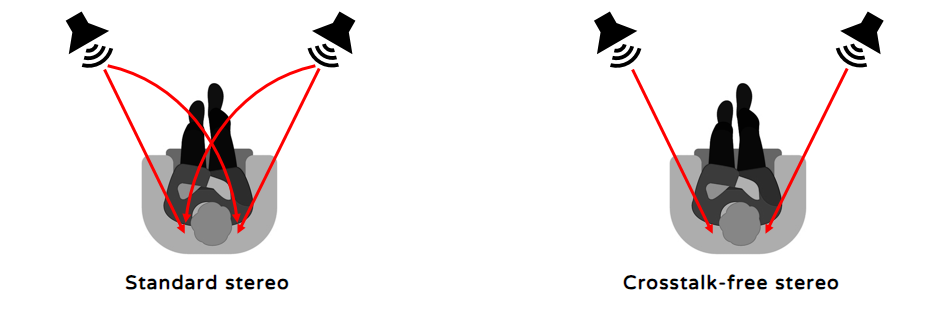
Different recording methods are used to create stereo recordings, depending on the type of content and taste of the sound engineer. Some of these methods such as A/B or ORTF (Office de Radiodiffusion Télévision Française) contain crosstalk already. For them, additional stereo crosstalk from the speakers during sound reproduction is neither required nor desirable. The crosstalk-free version of myHRTF Personalized Filters do not contain the crosstalk signal described above. For suitable recordings, this provides for a wider and deeper soundstage with significantly more immersion.
Room Acoustics and Speaker Distance
myHRTF Personalized Filters contain different synthetic room acoustics in order to adapt it to the use case and recording. All rooms feature the following characteristics:- No reflections within the first 5 ms after arrival of the direct wave, with the exception of wanted reflections from your body as part of your HRTF. This avoids that reflections affect the HRTF.
- No strong reflections within the first 20 ms after arrival of the direct wave, in line with Recommendation ITU-R BS.1116-3. This allows to hear the room acoustics captured on the recording rather than the listening room.
- Reflections from favorable directions only, i.e. no reflections from above or behind. This avoids that reflections with little contribution to externalization and envelopment decrease imaging.
- No resonances / room modes (in line with Recommendation ITU-R BS.1116-3), for a dry and precise yet fullbodied bass frequency range.
- No flutter echoes (in line with Recommendation ITU-R BS.1116-3), for a smooth and clear treble range.
Recording Studio
Recording studio (Studio) simulates a perfectly symmetric room with 42 m² and approx. 270 ms reverberation time (above 200 Hz), in line with Recommendation ITU-R BS.1116-3. Studio sounds very dry, the reverberation is hardly perceivable.- Speaker distance 1 m: recommended for mixing / mastering in the nearfield, as well as gaming / virtual reality.
- Speaker distance 3 m: recommended for mixing / mastering in the farfield and for listening to dry stereo recordings that contain little reverberation. In addition, it is recommended for multichannel recordings and TV/movies.
Livingroom
Not to be confused with an average livingroom, this is a large acoustically treated and perfectly symmetric room with approx. 480 ms reverberation time (above 200 Hz), with a speaker distance of 3 m. Livingroom sounds more live than Studio, the reverberation is perceivable in a pleasant way and contributes to externalization. It is recommended for stereo recordings that contain reverberation.
Concert and Recital Hall
Stereo sound reproduction in typical listening rooms fails to create the sense of space and envelopment that can be experienced in concert halls. myHRTF Personalized Filters add this spaciousness and envelopment to the music and turn your headphones into a recital or concert hall by mouse click. They do so by adding reverberation with optimum reverberation times as recommended by experts such as Leo Beranek. Recital Hall features a reverberation time (above 200 Hz) of approx. 1.6 s, concert hall features approx. 1.9 s.Signal Clipping
All digital signals feature a maximum peak value that can be represented by a number. In case the signal happens to be higher than that, it is cut off above this peak value, causing distortion that can range from barely noticable to strongly audible. In general, this needs to be taken into account when applying digital signal processing such as the use of myHRTF Personalized Filters.
Most headphones require a significant level boost especially in the subwoofer frequency range. In order to allow for this boost, all other frequencies need to be reduced in level to avoid signal clipping as described above. myHRTF Personalized Filters have approx. 10 dB level boost. Consequently, all signals should be reduced in level by 10 dB before being processed with myHRTF Personalized Filters by setting the pre-amplifier or volume accordingly.
In theory, it would be possible to include the required level reduction of 10 dB inside myHRTF Personalized Filters, but this would lead to uncomfortably high and potentially harmful volume changes when switching filters on and off (bypass) due to the massive level differences as described.
Supported Applications
myHRTF Personalized Filters are compatible with software media players, plugins and equalizer (EQ) applications featuring convolution engines that support either so-called stereo convolution or convolution by means of configuration files that follow the "Convolver standard" as described here.
The following applications and products have been tested successfully:
- AUDIRVANA (media player), for details see User Guide
- CONVOLOGY XT (plugin), for details see User Guide
- EQUALIZER APO (EQ software), for details see User Guide
- FOOBAR2000 (media player), for details see User Guide
- HANG-LOOSE CONVOLVER (plugin), for details see User Guide
- HIBY DAP (digital audio player), for details see User Guide
- JRIVER MEDIA CENTER (media player), for details see User Guide
- ROON (media player), for details see User Guide